Milan's Thoughts
Introducing MMAVT
Nov 10, 2023After a lot of work, I’ve finally finished the my first addon for Blender, MMAVT! (Milan’s Mesh Animation Visiblity Tool.) A system designed to make low-poly animation idiosyncrasies easier to import into game engines.
In the 90s, during the boom of 3D-rendered games, skeletal animation using mesh skinning could be very expensive and characters generally were quite low poly, and so developers could not create complex expressions through vertex manipulation alone (this wouldn’t really start to be a thing until the 6th generation.)
But the developers wanted to convey emotion to the audience, and so to get around this, games would often just swap out specific meshes on character’s faces or hands in order to convey specific expressions.
And I honestly love how this looks! I feel like these hand-drawn expressions allow you to really get a specific look or style down.
But unfortunately, from the 7th generation onward, this was rarely seen outside of portable titles. This is where independent developers would pick up the slack, as now retro aesthetics from the 90s would make their return in indie games.
…Sort of. With a quick google search you’ll see plenty of recommendations to
- Use a sprite sheet and offset the uvs at runtime
- Use a transparent mesh sitting ontop of the base mesh for your expressions and swap those out
And I’m not a huge fan of either of these methods. I don’t think they’re bad for specific games (Psuedoregalia’s main character looks quite good with 2nd method, and not in spite of it!) but doing research into models from retro games, you’ll see that they would often use multiple meshes with the uv-data specific to that mesh, and swap those out when needed. It also gives you a bit more leeway into how you can place your UVs
But even this is not a good enough solution in itself, another problem that I see a lot of indie game developers doing is manually enabling and disabling mesh rendering components in the engine to achieve these features. I understand that some sequencing will have to be done in-engine, as things like particles systems are very engine-specific. But flipping a mesh’s visiblity on or off? I felt that there had to be a better way, and so I set off with the goal of making a system that would streamline the creation and exporting of these systems into game engines.
Here’s some footage of MMAVT in action!
And like I said, Unity is easily exportable to!
So how does MMAVT work exactly?
There are two systems inside of MMAVT, the Mbody system and the optional HFEM system
The Mbody system lets you swap meshes inside of groups.
When we go outside the range of a group, everything is invisible. You can use this, for example, to leave 0 open for empty objects. 0 could be a character holding nothing, and 1 can for holding a certain item like a sword!
The HFEM system is a little more complicated, but basically there is a hierarchy of the head > face > eyes/mouth. This is to say that each head will have its own unique set of faces, eyes, and mouths, each face has its own unique set of eyes and mouths, and eyes and mouths work independently of eachother, relying on their own set of values to decide whether they are visible or not
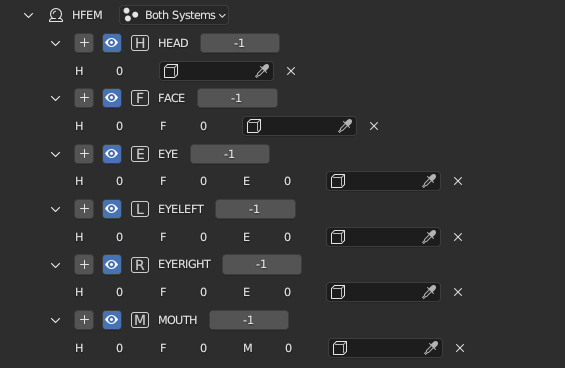
As you can see, in order to display a specific head, we only need to change one head value, and as we go down the hierarchy we need to map to specific instances of heads and faces (although I will say, you actually don’t need to use the head or face functions at all if you don’t want to, it will still work as long as you don’t touch them!)
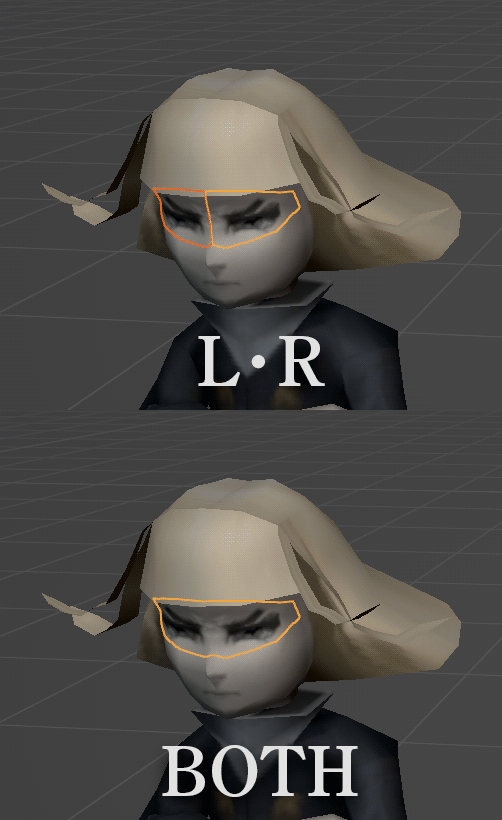
You may have noticed in that screenshot that there are two eye systems, ‘EYE’ and “EYELEFT’/ ‘EYERIGHT’. I wanted this system to work as broadly as possible, so it can work with left or right eye meshes or even a conjoined eye mesh system, both with their own pros and cons. I even made it so that they can be used interchangably! The left/right eye system will come into play as long as the both eye option is set to -1. And if you’d prefer to just hide the eye system you’re not planning to use, you can select a different option that works best for your model.
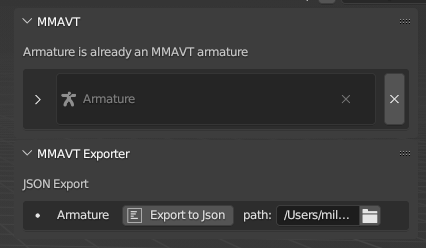
Exporting to your game engine of choice is simple, just click the “Export to Json” button next to the armature name and it will export everything you need in a .json file (Down the line I’d like to implement a binary format too but one step at a time…)
To be honest, I don’t actually have any intention (at the moment) to make an official plugin. I’m currently working on a serious personal project at the moment and can’t really divide my time between maintaining a Unity/Godot/Unreal/Bevy/etc plugin. While I am making my personal project in Unity at the moment I don’t really intend to implement functionality in a way that would work best for a plugin. Don’t get me wrong, I do compartamentalize my code, but I’m not sure if my personal needs for its functionality will align best with a general use plugin.
That being said, I’ve provided an example for how this functionality could be implemented in Unity, along with the editor tools for doing so.
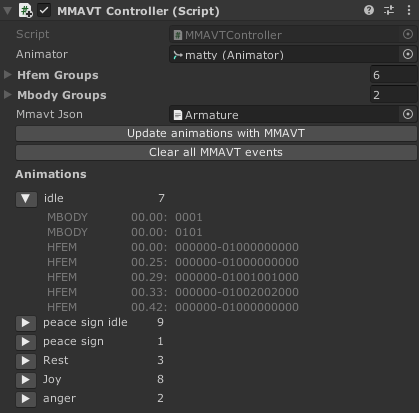
“Mmavt Json” is where we can drag the json file we exported to ready for parsing
“Update Animations with MMAVT” will start the parsing proceess and convert our .json into animation events for Unity to put into our animation clips
“Clear all MMAVT events” will get rid of all MMAVT events on our animation clips, though keep in mind that you don’t have to clear before updating the MMAVT events as the button above will clear MMAVT events anyways
“Animations is just a way to view all of the MMAVT events at once
I’d like to address the potential elephant in the room. Yes, for the Unity animation event method that I’m showcasing in Unity, you will have to call a unity event every time you want to play a MMAVT system. Now in Unity we can pass a single int, float, string, and Unity object. I unfortunately had to go with strings, though I tried my best to avoid any C# string manipulation (treating the string more like an array of integers since it basically is one.) There is an alternate method of manually creating your own MMAVT event sequencer but I wanted to keep the example simple.
And that covers everything! Here is a link to the:
Note that the addon is in an alpha state right now and there are some bugs/oddities that need to be fixed. If you find a bug please file an issue so I can try to get to fixing it! At the moment here are some things to keep in mind:
- The armature dataname and the object it’s encapsulated in MUST share an identical name
- Mbody’s group name changes don’t update immediately…
- Because of my C# background I have named some variables that I now need to change to python naming specs. In general there are some variable names that need to be updated for better readability, so things may break in the future.I wouldn’t do anything serious with this addon at the moment
That’s all for now, I hope you enjoy the addon!